Next.js, NestJS and Four Security Zones on AWS
On 3 December 2025, React disclosed CVE-2025-55182: unauthenticated remote code execution in React Server Components, scored CVSS 10.0. Next.js 15 and 16 App Router apps were affected, and the advisory was blunt about who was exposed: "Even if your app does not implement any React Server Function endpoints it may still be vulnerable if your app supports React Server Components."
That week the useful question wasn't "are we vulnerable?" Everyone was, until they patched. It was: what can someone who controls our Next.js server reach?
If the answer is "the database," you're having a very bad week. If it's "the orders API, with this server's own narrow permissions, and every call still needs a valid user token," you're having an annoying one.
That difference is the whole argument for security zones. This post is the architecture I'd use for a Next.js front end and NestJS services on AWS:
- the four zones and what each may reach;
- how services find each other and trust each other;
- the resilience patterns that stop one slow dependency from taking the whole site down: timeouts, retries, circuit breakers, bulkheads and an outbox.
Where AWS, Google, Netflix and others have published how they do the same thing, I've quoted and linked it. Every code block was type-checked, synthesized or run against the current versions of its libraries before it went in.
The shape: four zones, traffic flows one way
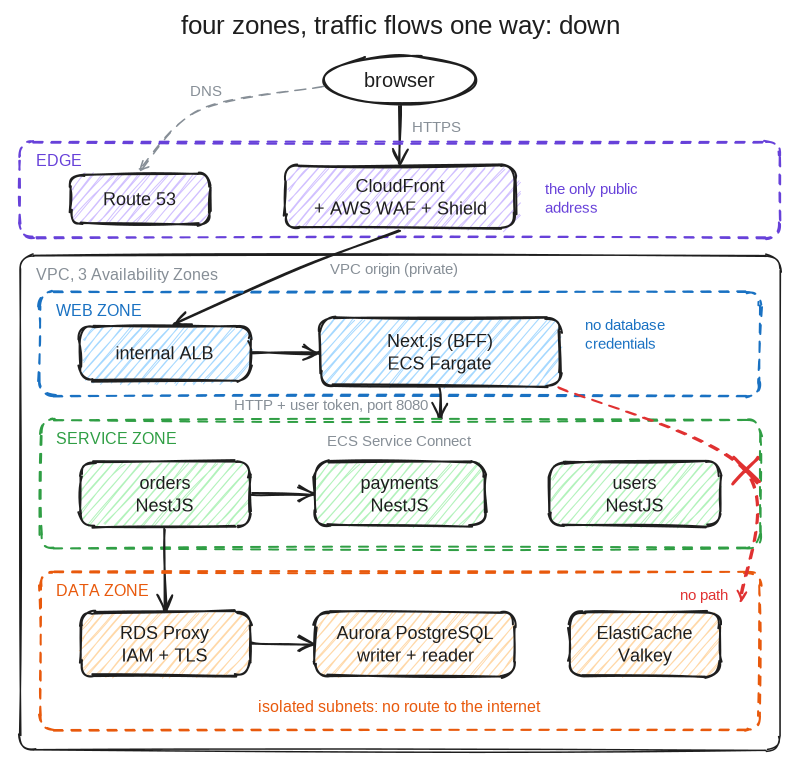
- Edge: Route 53, CloudFront, AWS WAF, Shield. The only thing with a public address.
- Web: Next.js, running as a backend-for-frontend. It renders pages, holds the user's session and calls services. It holds no database credentials.
- Service: NestJS services. Each is its own ECS service with its own security group and IAM role, and owns its own data.
- Data: Aurora PostgreSQL behind RDS Proxy, plus ElastiCache. Isolated subnets with no route to the internet.
Four rules turn those boxes into zones:
- Each zone accepts connections only from the zone directly above it, on one port.
- No zone skips a level. The web tier cannot open a socket to the database. Not "shouldn't": cannot.
- Every hop re-checks identity. Being inside the VPC proves nothing.
- Each boundary is enforced twice, by the network (subnets, routes, security groups) and by identity (IAM, tokens). Either one alone eventually grows a hole.
Rule 4 is how AWS's Well-Architected Framework describes protecting networks: "identity decides who can call an action, and the network decides which components can communicate at all." It also explains why one perimeter isn't enough: "A flat network where every resource can reach every other resource offers no containment, so a single point of unauthorized access exposes everything behind it."
Rule 3 is what NIST calls zero trust: "no implicit trust granted to assets or user accounts based solely on their physical or network location" (SP 800-207). Google's version, BeyondProd, is blunter: "Only authenticated, trusted, and specifically authorized callers or services can access any other service." Zones aren't the opposite of zero trust. They limit the damage when one of the trusted things turns out not to be.
Zone 0: the edge
The browser talks to CloudFront and nothing else.
- Route 53 for DNS, ACM for the certificate.
- CloudFront terminates TLS and caches
/_next/static/*; the filenames are content-hashed, so those can be cached forever. Everything else goes to the web tier. - AWS WAF on the distribution, with three managed rule groups:
AWSManagedRulesCommonRuleSet,AWSManagedRulesKnownBadInputsRuleSetandAWSManagedRulesAmazonIpReputationList. Add a rate-based rule on login and API paths; it "counts incoming requests and rate limits requests when they are coming at too fast a rate." That's your first, cheapest layer of load shedding. - Shield Standard is on automatically, "at no additional charge."
Microsoft's architecture guide calls this the Gatekeeper pattern: a dedicated component in front of the application that "can provide an extra layer of security and limit the system's attack surface."
The interesting hop is CloudFront into the VPC. With VPC origins, CloudFront reaches an Application Load Balancer in a private subnet. There's no public load balancer at all, so nobody can go around CloudFront and WAF by calling the ALB directly. Two things to know:
- The VPC still needs an internet gateway attached. CloudFront doesn't route through it, but requires it.
- The ALB's security group must let CloudFront in. Allow either the service-managed
CloudFront-VPCOrigins-Service-SGgroup or thecom.amazonaws.global.cloudfront.origin-facingmanaged prefix list.
Without VPC origins, the older pattern is a public ALB whose security group allows only that prefix list, plus a secret header that CloudFront adds and the ALB checks. It works; it's one more secret to rotate.
Zone 1: Next.js as a backend-for-frontend
Next.js runs as an ECS Fargate service, built with output: 'standalone', in private subnets behind the internal ALB. Its job is the backend-for-frontend (BFF) pattern from Sam Newman. Microsoft's summary: "Create a separate backend service for each frontend interface." Netflix made the same move, shifting its front-end services from the Java API tier "to a BFF (backend for frontend), aka NodeQuark", written in JavaScript.
The browser never sees a service URL or an access token. It holds a session cookie (httpOnly, Secure, SameSite=Lax), and the Next.js server turns that into an access token and calls services on the user's behalf.
All of that lives in one data-access module that can't end up in a client bundle:
// lib/orders.ts: the only code in the web tier that talks to the orders service
import 'server-only'
import { getSession } from './session' // decrypts the httpOnly session cookie (Auth.js, iron-session, ...)

const ORDERS_URL = process.env.ORDERS_URL ?? 'http://orders:8080' // never NEXT_PUBLIC_

export type Order = { id: string; status: string; totalCents: number }

export async function listOrders(): Promise<Order[]> {
  const session = await getSession()
  if (!session) throw new Error('unauthenticated')

  const res = await fetch(`${ORDERS_URL}/orders`, {
    headers: { authorization: `Bearer ${session.accessToken}` },
    signal: AbortSignal.timeout(2_000),
    cache: 'no-store',
  })
  if (!res.ok) throw new Error(`orders responded ${res.status}`)
  return (await res.json()) as Order[]
}
Four lines in there are doing security or reliability work:
import 'server-only'fails the build if a client component imports this file. The Next.js data security guide recommends exactly this, inside a dedicated Data Access Layer.ORDERS_URLis a plain server variable. Anything prefixedNEXT_PUBLIC_is "inlined into the JavaScript bundle duringnext build". A public variable holding an internal URL hands every visitor a map of your zones.AbortSignal.timeout(2_000). Without it, Node'sfetchwaits up to five minutes for response headers: the defaultheadersTimeoutin undici, the HTTP client behind it, is 300 seconds. One slow service, and every page render queues behind it.- The token gets checked again by the orders service. In March 2025, CVE-2025-29927 let a request skip Next.js middleware entirely by sending the internal
x-middleware-subrequestheader. Apps whose only authorization was in middleware had none. Next.js 16 renamed middleware toproxy.ts, and the docs now say: "Always verify authentication and authorization inside each Server Function rather than relying on Proxy alone." Server Actions are "reachable via a direct POST request". Treat each one as a public API endpoint, because it is.
What the web zone can reach: the service zone on port 8080, and AWS APIs through VPC endpoints. What it can't reach: anything in the data zone. There's no security-group rule, no IAM permission and no credential that would let it.
One AWS-specific trap: Node's HTTP server closes idle keep-alive connections after 5 seconds, while the ALB keeps them for 60. When the ALB reuses a connection Node has just closed, the user gets a 502. AWS's ALB troubleshooting guide says to "check whether the keep-alive duration of the target is shorter than the idle timeout value of the load balancer." Make Node's the longer one: next start --keepAliveTimeout 65000. The standalone server.js reads the same setting from KEEP_ALIVE_TIMEOUT; that isn't in the docs, but it's in the generated file.
Zone 2: NestJS services
Each service (orders, payments, users) is its own ECS Fargate service. Fargate tasks use awsvpc networking, so "every Amazon ECS task on Fargate is provided an elastic network interface". Every task gets its own security group, which is what lets you write firewall rules per service instead of per subnet.
Finding each other: Service Connect
ECS Service Connect gives each service a short DNS name (http://payments:8080) and runs an Envoy-based proxy next to every task. Without you writing code, it:
- encrypts traffic with TLS, using certificates from AWS Private CA that rotate automatically;
- ejects tasks that keep failing (outlier detection);
- retries failed requests twice, avoiding the task that just failed;
- applies a per-request timeout. The default is 15 seconds, far too long for an internal call, so set
perRequestTimeout.
It doesn't decide who may call whom. The docs say plainly that "Service Connect only interconnects services", and reachability is left to security groups. Its TLS is for encryption; the docs don't describe client authentication.
If you need AWS to prove the caller's identity on every request, put that boundary on Amazon VPC Lattice instead. Its auth policies are IAM policies attached to a service or a whole service network, and callers sign their requests with SigV4. "Only the web tier's task role may call GET /orders/*" becomes a policy, not a convention.
If you used AWS App Mesh for this: it reached end of support on 30 September 2026, and AWS points App Mesh users to Service Connect.
Netflix arrived at the same design, a proxy next to every service, from the other direction (Zero Configuration Service Mesh with On-Demand Cluster Discovery):
- Its services used to find each other with Eureka and handle load balancing, retries and circuit breaking in a client library, Ribbon.
- Over time the list grew to "adaptive concurrency limiting, circuit breaking, hedging, and fault injection", across Java, Node.js and Python clients.
- "Keeping feature parity between all of these implementations and ensuring that they all behave the same way is challenging: what we want is a single, well-tested implementation of all of this functionality". So Netflix moved that logic into Envoy.
Service Connect is a managed Envoy, but a deliberately small one. You can change its timeouts and TLS; its retries and outlier detection are built in; there's no circuit breaker, hedging or concurrency limit to configure. That's why the circuit breaker later in this post lives in application code.
A service in CDK, with the per-request timeout and ECS's deployment circuit breaker:
const ecsCluster = new ecs.Cluster(stack, 'Cluster', { vpc })
ecsCluster.addDefaultCloudMapNamespace({ name: 'shop.internal', useForServiceConnect: true })

new ecs.FargateService(stack, 'Orders', {
  cluster: ecsCluster,
  taskDefinition: ordersTask,
  desiredCount: 6, // across 3 AZs, sized so any two AZs can carry peak load
  vpcSubnets: { subnetGroupName: 'svc' },
  securityGroups: [ordersSg],
  serviceConnectConfiguration: {
    services: [{ portMappingName: 'http', dnsName: 'orders', port: 8080, perRequestTimeout: Duration.seconds(3) }],
  },
  circuitBreaker: { enable: true, rollback: true }, // roll back a deployment whose tasks keep failing
})
That desiredCount comment is AWS's static stability idea: "In a statically stable design, the overall system keeps working even when a dependency becomes impaired." Here the dependency is an Availability Zone. If losing one AZ means waiting for a scale-up, you're not statically stable.
Trusting each other: two identities on every hop
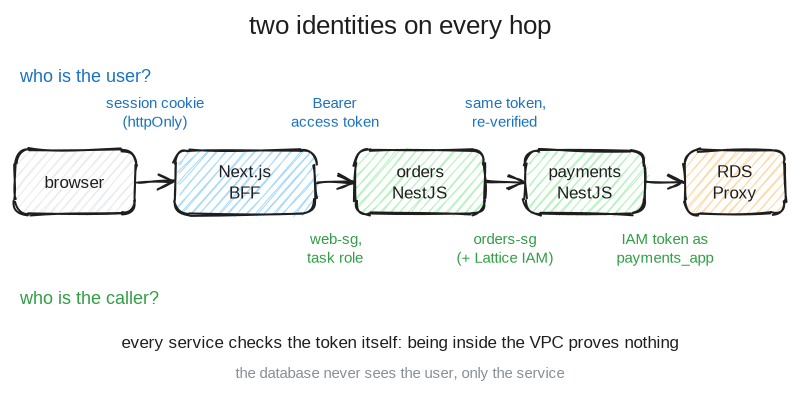
Every internal request carries two identities, and you need both:
- Who the user is: the access token, forwarded from the BFF. Every service verifies it itself.
- Who the caller is: the workload, shown by its security group, task role and (with Lattice) a SigV4 signature.
Verifying a Cognito token is a few lines with AWS's aws-jwt-verify. It fetches the signing keys once and checks expiry, issuer, token_use and client_id:
// auth/jwt.guard.ts: registered globally with APP_GUARD, so every route verifies the caller's user
import { CanActivate, ExecutionContext, Injectable, UnauthorizedException } from '@nestjs/common'
import { CognitoJwtVerifier } from 'aws-jwt-verify'

const verifier = CognitoJwtVerifier.create({
  userPoolId: process.env.USER_POOL_ID!,
  tokenUse: 'access',
  clientId: process.env.WEB_CLIENT_ID!,
})

@Injectable()
export class JwtGuard implements CanActivate {
  async canActivate(ctx: ExecutionContext): Promise<boolean> {
    const req = ctx.switchToHttp().getRequest()
    const [scheme, token] = String(req.headers.authorization ?? '').split(' ')
    if (scheme !== 'Bearer' || !token) throw new UnauthorizedException()
    try {
      // signature (keys fetched once and cached), exp, iss, token_use, client_id
      req.user = await verifier.verify(token)
      return true
    } catch {
      throw new UnauthorizedException()
    }
  }
}
Google's version of this is ALTS, where "communications between services are mutually authenticated" and "identities are bound to entities instead of to a specific server name or host." You don't need Google's infrastructure to get the same property: a user token verified at every hop, plus a workload identity checked at every boundary.
Forwarding the user's access token is the simple version, and Netflix has written about where it goes wrong (Edge Authentication and Token-Agnostic Identity Propagation):
- "Externally valid tokens were being minted deep down in the stack and they needed to be propagated all the way upstream, opening possibilities for them to be logged inappropriately or potentially mismanaged."
- Services cracked tokens open and passed identity along "via request context headers, or even as URL parameters", with "no checks in place to ensure the integrity of the tokens or the data contained therein."
Netflix's fix was to end every external token at the edge, in its Zuul gateway plus a set of Edge Authentication Services. The rest of the system receives an "integrity-protected token-agnostic identity object" called a Passport.
In this stack, the BFF is the natural place for that exchange: verify the Cognito token once, mint a short-lived internal token whose audience is your services, and never let the external token past the web zone. It's more moving parts. It pays off once you have more than one kind of client token, or once tokens start showing up in logs.
Calls that aren't on behalf of a user, like a nightly job or a webhook consumer, use their own credentials: a Cognito client-credentials token or, with Lattice, the task role. Never reuse a user's token after that user's request has finished.
Sync for questions, events for news
A synchronous chain is only as available as all of its links multiplied together. Five services at 99.9% each give you 99.5%, which is about 44 hours of downtime a year instead of 9. So keep request paths shallow: the BFF calls one or two services, and those call at most one more. Anything that announces "this happened" rather than asking "tell me now" becomes an event (the outbox, below).
Generate an OpenAPI document from the NestJS controllers with @nestjs/swagger, and generate the BFF's typed client from it. A breaking change then fails the web tier's build, not production.
Zone 3: data
- Aurora PostgreSQL in isolated subnets, with a writer and a reader in different Availability Zones. Aurora replicates the data to six storage nodes across AZs. When the writer fails, the reader is promoted, and AWS says service "is typically restored in less than 60 seconds, and often less than 30 seconds."
- RDS Proxy in front of it. Fargate scales by adding tasks, and every task wants its own connection pool: a hundred tasks with ten connections each is a thousand connections, which PostgreSQL does not enjoy. The proxy pools and shares them. It can also "reduce failover times by up to 66%", because applications keep their connection to the proxy while it switches writers underneath.
- IAM authentication, so no task holds a database password. Each task requests a short-lived token for its own database user. The proxy's end-to-end IAM mode uses IAM between the proxy and Aurora too, so there's no password anywhere.
- TLS required on the proxy. On Aurora PostgreSQL 16 and older, also set
rds.force_ssl = 1; it's only on by default from version 17. - One database user per service, owning its own schema. The orders service can log in as
orders_appand nothing else, and no service reads another's tables. Migrations run as a one-off ECS task with a separate migration user; the application user has no rights to change the schema. - ElastiCache for Valkey for caching and shared rate-limit counters, in the same isolated subnets.
In CDK:
const cluster = new rds.DatabaseCluster(stack, 'Db', {
  engine: rds.DatabaseClusterEngine.auroraPostgres({ version: rds.AuroraPostgresEngineVersion.VER_17_9 }),
  writer: rds.ClusterInstance.serverlessV2('writer'),
  readers: [rds.ClusterInstance.serverlessV2('reader', { scaleWithWriter: true })],
  vpc,
  vpcSubnets: { subnetGroupName: 'data' },
  securityGroups: [dbSg],
  storageEncrypted: true,
  iamAuthentication: true,
})

const proxy = cluster.addProxy('Proxy', {
  vpc,
  vpcSubnets: { subnetGroupName: 'data' },
  securityGroups: [proxySg],
  iamAuth: true, // tasks authenticate with a short-lived IAM token, not a password
  defaultAuthScheme: rds.DefaultAuthScheme.IAM_AUTH, // and the proxy uses IAM to reach Aurora
  requireTLS: true,
})

// Each service may log in as its own database user, and only that one.
proxy.grantConnect(ordersTask.taskRole, 'orders_app')
proxy.grantConnect(paymentsTask.taskRole, 'payments_app')
grantConnect writes the IAM policy for you. It grants rds-db:connect on the proxy's resource ID (prx-...) for that one user, which is the format AWS's RDS Proxy docs use.
The network that enforces it
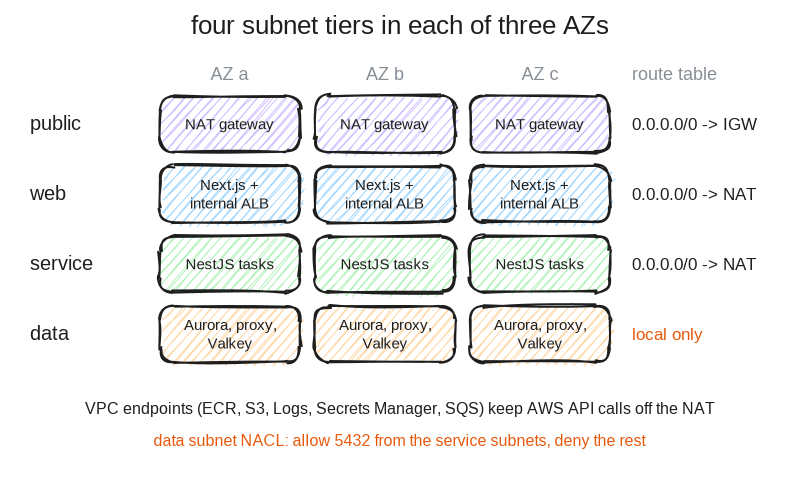
- Public subnets hold NAT gateways and nothing else. With VPC origins, even the ALB is private.
- Web and service subnets route
0.0.0.0/0to a NAT gateway only because some service needs a third party, like a payment provider or an email API. If none do, drop the NAT. - Data subnets have a route table with only the local route. There is no way out.
- AWS APIs go through VPC endpoints. On Fargate platform 1.4.0 and later, tasks need
ecr.api,ecr.dkrand the S3 gateway endpoint to pull images, pluslogs, Secrets Manager and SQS as you use them. That keeps AWS traffic off the NAT and off the internet. - Security groups are stateful and can name other security groups as their source, so rules follow tasks as they scale. Network ACLs are stateless and coarse: use them as a backstop, not the main control.
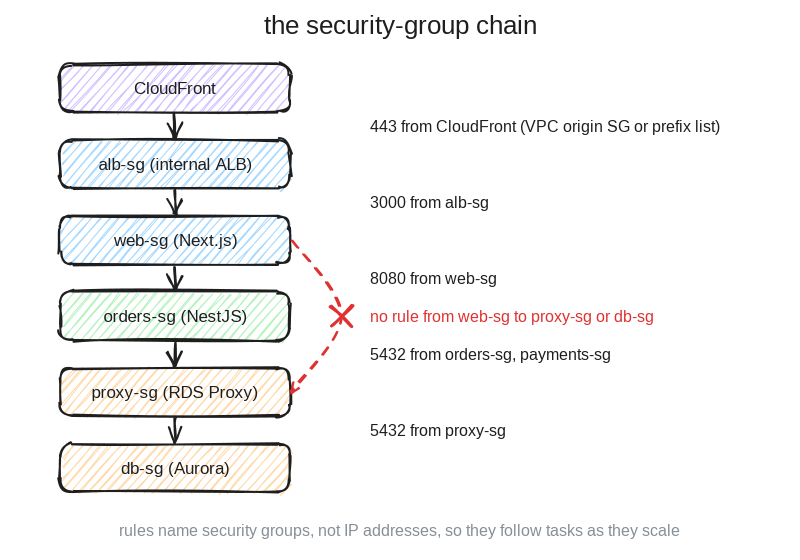
In CDK, the subnets and the chain are about twenty lines. The rules that aren't there are the point:
// Four subnet tiers across three AZs. Only "edge" routes to the internet gateway,
// and "data" has no route out of the VPC at all.
const vpc = new ec2.Vpc(stack, 'Vpc', {
  maxAzs: 3,
  natGateways: 3,
  subnetConfiguration: [
    { name: 'edge', subnetType: ec2.SubnetType.PUBLIC, cidrMask: 24 },
    { name: 'web', subnetType: ec2.SubnetType.PRIVATE_WITH_EGRESS, cidrMask: 22 },
    { name: 'svc', subnetType: ec2.SubnetType.PRIVATE_WITH_EGRESS, cidrMask: 22 },
    { name: 'data', subnetType: ec2.SubnetType.PRIVATE_ISOLATED, cidrMask: 24 },
  ],
})

// One security group per component, none with "allow all outbound".
const sg = (id: string) => new ec2.SecurityGroup(stack, id, { vpc, allowAllOutbound: false })
const [albSg, webSg, ordersSg, paymentsSg, proxySg, dbSg] =
  ['AlbSg', 'WebSg', 'OrdersSg', 'PaymentsSg', 'ProxySg', 'DbSg'].map(sg)

const cloudFront = ec2.PrefixList.fromLookup(stack, 'CloudFront', {
  prefixListName: 'com.amazonaws.global.cloudfront.origin-facing',
})
albSg.addIngressRule(ec2.Peer.prefixList(cloudFront.prefixListId), ec2.Port.tcp(443), 'CloudFront -> ALB')
webSg.connections.allowFrom(albSg, ec2.Port.tcp(3000), 'ALB -> Next.js')
ordersSg.connections.allowFrom(webSg, ec2.Port.tcp(8080), 'Next.js -> orders')
paymentsSg.connections.allowFrom(ordersSg, ec2.Port.tcp(8080), 'orders -> payments')
proxySg.connections.allowFrom(ordersSg, ec2.Port.tcp(5432), 'orders -> RDS Proxy')
proxySg.connections.allowFrom(paymentsSg, ec2.Port.tcp(5432), 'payments -> RDS Proxy')
dbSg.connections.allowFrom(proxySg, ec2.Port.tcp(5432), 'RDS Proxy -> Aurora')
// Missing on purpose: webSg -> proxySg and webSg -> dbSg. The web zone has no path to the data zone.
I synthesized this stack and asserted against the generated CloudFormation:
- no security-group rule exists from
web-sgto the proxy or the database; - there are nine default routes (three public, three web, three service), and none in a data subnet.
Turn checks like these into a unit test, and someone "temporarily" opening the database to the web tier becomes a failing build, not a review comment. Google's BeyondProd calls these places choke points: "Choke points allow for policies to be consistently enforced across services."
Well-Architected's SEC05-BP01 and SEC05-BP02 cover the same ground: "Internet-facing components are separated from internal ones, so someone who reaches a public entry point cannot move freely toward sensitive systems." Those controls "are most reliable when they are expressed as code and deployed through automation rather than configured manually", which is the case for the CDK and the assertions above.
When a dependency gets slow
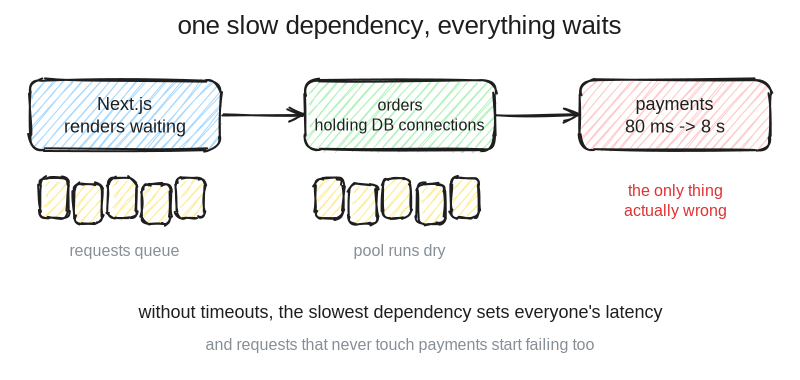
Outages in a system like this rarely start with something being down. They start with something being slow:
- Payments goes from 80 ms to 8 seconds.
- Orders' requests to payments pile up, each holding a database connection while it waits.
- The pool empties, so orders requests that never touch payments start waiting too.
- Next.js renders queue up behind orders.
Within a minute the whole site is timing out, and the only broken thing was one dependency's latency.
Google's SRE book has a chapter on exactly this, Addressing Cascading Failures. Netflix built Hystrix to "stop cascading failures." AWS's Builders' Library has a whole shelf on it. They reach for the same defences.
The Well-Architected Framework's section on designing interactions to withstand failures states the goal in one sentence: "Designing each interaction to expect failure is what keeps one struggling dependency from taking the rest of the system down with it."
Timeouts, from a deadline
Every network call gets a timeout, and they nest, with the longest on the outside:
- CloudFront to web: CloudFront's origin response timeout defaults to 30 seconds.
- Web to service: 2 seconds.
- Service to service: 1.5 seconds overall, 600 ms per attempt.
- Service Connect's per-request timeout: a backstop slightly above the app's.
Don't trust defaults here. REL05-BP05 says: "Set both connection and request timeouts on every call across a process boundary". Defaults "are often infinite or far higher than your service goals allow", and the 300-second fetch default and Service Connect's 15 seconds are both examples.
How to pick the numbers, from AWS's Timeouts, retries, and backoff with jitter: choose "an acceptable rate of false timeouts (such as 0.1%)", then use that latency percentile of the dependency (p99.9).
Google adds deadline propagation: "a deadline is set high in the stack (e.g., in the frontend)", and each hop gets what's left. No backend should keep working on a request whose user has already given up.
For idempotent reads with a long tail, Google adds hedged requests (The Tail at Scale, Dean and Barroso, 2013):
- Send a second copy to another replica, and use whichever answers first.
- Wait before sending it: "defer sending a secondary request until the first request has been outstanding for more than the 95th-percentile expected latency". That "limits the additional load to approximately 5%".
- In Google's BigTable benchmark, hedging after 10 ms cut the p99.9 latency "from 1,800ms to 74ms while sending just 2% more requests."
Count hedges against the same retry budget as retries.
Retries: few, jittered, in one place
Retries turn a blip into a non-event, and an outage into a stampede. AWS and Google draw the same lines:
- Retry at one layer. AWS: "our best practice is to retry at a single point in the stack". If every layer of a five-deep stack retries three times, "the load on the database will increase 243x." Google: retry only "at the layer immediately above the layer that is rejecting them."
- Cap them. Google uses "a per-request retry budget of up to three attempts", plus a per-client budget: a request is retried "only as long as this ratio is below 10%". AWS limits retries locally with a token bucket.
- Jitter. Exponential backoff alone synchronizes clients into waves. AWS: "Our solution is jitter." Google: "Always use randomized exponential backoff when scheduling retries."
- Only retry what's safe to repeat. "APIs with side effects aren't safe to retry unless they provide idempotency" (AWS). For writes, send an idempotency key. Stripe's
Idempotency-Keyis the well-known version: "Retries with the same key return the saved response". AWS models the same thing as aClientTokenin its own APIs (Making retries safe with idempotent APIs). The Well-Architected practice is REL04-BP04, "Make mutating operations idempotent".
REL05-BP03 sums up this whole section. Retry with "exponential backoff with jitter and a maximum attempt or elapsed-time limit", and "retry only errors that a retry can resolve, and stop on errors that will not". That last part is what isRetryable does in the code below.
The AWS-specific trap: Service Connect's proxy already retries twice. Three attempts in your code times three in the proxy is nine requests to a service that's already struggling. With Service Connect in the path, one retry in application code is plenty.
Circuit breakers
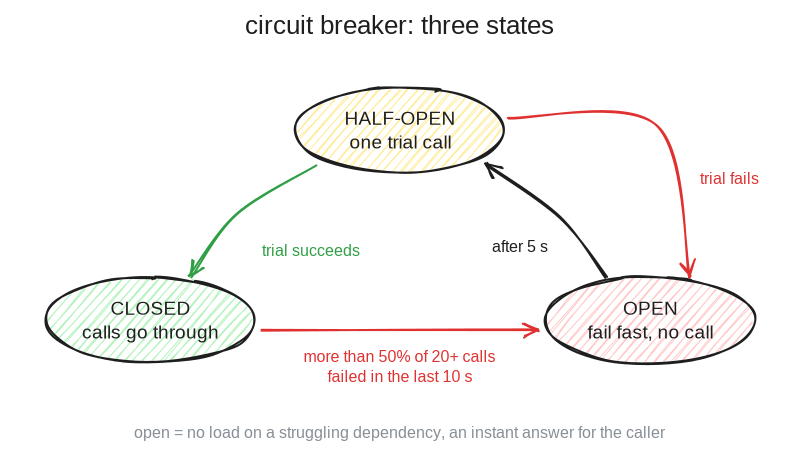
A retry handles a blip; a circuit breaker handles an outage:
- It watches the failure rate of calls to one dependency.
- Past a threshold it opens, failing every call immediately, without touching the network.
- After a pause it goes half-open and lets one trial call through. Success closes it; failure opens it again.
Martin Fowler described it in 2014. Netflix's Hystrix made it standard on the JVM, and AWS and Microsoft both document it as a pattern. Microsoft's one-line definition: "Temporarily block access to a remote service or resource after failures reach a threshold."
Hystrix itself is now "in maintenance mode". Its README points to resilience4j and says Netflix's focus "has shifted towards more adaptive implementations". In Node, the standard breaker is opossum. Here's the orders service's client for payments, with every layer from the next diagram:
// payments/payments.client.ts: how the orders service calls payments
import { Injectable, Logger } from '@nestjs/common'
import CircuitBreaker from 'opossum'

const PAYMENTS_URL = process.env.PAYMENTS_URL ?? 'http://payments:8080' // Service Connect name

export type PaymentStatus = { orderId: string; state: 'paid' | 'pending' | 'failed' }

export class HttpError extends Error {
  constructor(readonly status: number) {
    super(`payments responded ${status}`)
  }
}

// Exponential backoff with full jitter, bounded by attempts and by the caller's deadline.
async function retry<T>(fn: () => Promise<T>, attempts: number, deadline: AbortSignal): Promise<T> {
  for (let attempt = 1; ; attempt++) {
    try {
      return await fn()
    } catch (err) {
      if (attempt >= attempts || deadline.aborted || !isRetryable(err)) throw err
      const backoffMs = Math.random() * Math.min(400, 50 * 2 ** attempt)
      await new Promise(resolve => setTimeout(resolve, backoffMs))
    }
  }
}

function isRetryable(err: unknown): boolean {
  const code = (err as { code?: unknown }).code
  if (code === 'EOPENBREAKER' || code === 'ESEMLOCKED') return false // breaker open, bulkhead full
  if (err instanceof HttpError) return err.status >= 500 // a 4xx won't change on a second try
  return true // network error or attempt timeout
}

@Injectable()
export class PaymentsClient {
  private readonly log = new Logger(PaymentsClient.name)

  // Circuit breaker and bulkhead around ONE attempt.
  private readonly breaker = new CircuitBreaker(
    async (orderId: string, deadline: AbortSignal): Promise<PaymentStatus> => {
      const res = await fetch(`${PAYMENTS_URL}/payments/${encodeURIComponent(orderId)}`, {
        // this attempt gets 600 ms, and never runs past the overall deadline
        signal: AbortSignal.any([deadline, AbortSignal.timeout(600)]),
      })
      if (!res.ok) throw new HttpError(res.status)
      return (await res.json()) as PaymentStatus
    },
    {
      timeout: false, // the AbortSignal above times out AND cancels the request
      errorThresholdPercentage: 50, // open when more than half the calls in the window fail...
      volumeThreshold: 20, // ...once there have been at least 20 of them
      rollingCountTimeout: 10_000, // the window: 10 s
      resetTimeout: 5_000, // stay open 5 s, then let one trial call through
      capacity: 20, // bulkhead: at most 20 calls in flight to payments
      errorFilter: (err: unknown) => err instanceof HttpError && err.status < 500, // a 404 isn't an outage
    },
  )

  constructor() {
    this.breaker.on('open', () => this.log.warn('payments circuit OPEN'))
    this.breaker.on('halfOpen', () => this.log.log('payments circuit HALF-OPEN'))
    this.breaker.on('close', () => this.log.log('payments circuit closed'))
  }

  // Outside in: deadline, retry, circuit breaker, bulkhead, attempt timeout, fetch.
  async status(orderId: string): Promise<PaymentStatus | null> {
    const deadline = AbortSignal.timeout(1_500)
    try {
      return await retry(() => this.breaker.fire(orderId, deadline), 2, deadline)
    } catch (err) {
      // Degrade by leaving something out: the order page renders without a payment badge.
      this.log.warn(`payment status unavailable: ${(err as Error).message}`)
      return null
    }
  }
}
I ran this against a real HTTP server playing payments, with opossum 10:
- A 404 made one call: no retry, and nothing counted against the breaker.
- A 500 was retried exactly once.
- A dependency hanging for 2 seconds got two 600 ms attempts, and the caller had its answer at 1.3 seconds, inside the deadline.
- Sustained 500s opened the breaker. After that, calls returned in 0 ms with zero HTTP requests.
- Five seconds later it went half-open, one trial succeeded, and it closed.
- 25 concurrent calls to a slow payments: only 20 reached it.
The settings that matter:
volumeThreshold: without it, two failures out of two calls is a 100% error rate, and the breaker trips on noise.errorFilter: a 404 means the order doesn't exist, not that payments is down. Don't let client errors open the breaker.timeout: false: each attempt has its ownAbortSignal, which actually cancels the HTTP request. opossum's own timeout rejects the promise but leaves the request running, unless you give it anAbortController. That controller is shared by every call in flight, so one timeout would abort them all.capacity: the bulkhead, below.
Three subtleties that are easy to miss:
- Don't combine opossum's built-in
fallbackwith a retry. The fallback runs on every failed call, including the first, so your retry never sees an error. Put the fallback outside the retry, asstatus()does. - opossum counts bulkhead rejections as failures. In the test, 20 timeouts plus 5 "Semaphore locked" rejections opened the breaker, so the 20 second attempts failed instantly instead of waiting. That's what you want when payments is slow. It's not what you want if traffic spikes against a healthy dependency, so size
capacityfrom real concurrency, not a guess. - Emit the breaker's state as a metric and alarm on
open. An open breaker is the system protecting itself, but it's also a dependency down, and someone should know.
The order of the layers
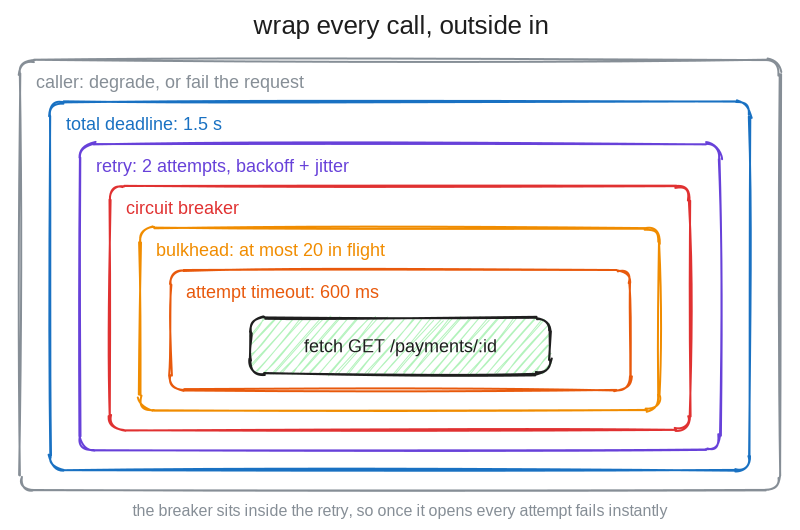
Wrap the call from the outside in:
- total deadline
- retry
- circuit breaker
- bulkhead
- per-attempt timeout
- the call itself
The breaker sits inside the retry, so each attempt is counted and, once it opens, every remaining attempt fails instantly instead of waiting. The attempt timeout sits inside the breaker, so timeouts count as failures.
This isn't my preference; it's the common order:
- Microsoft's standard resilience handler for .NET is rate limiter, total timeout, retry, circuit breaker, attempt timeout, "from the outermost to the innermost."
- resilience4j's default is
Retry ( CircuitBreaker ( RateLimiter ( TimeLimiter ( Bulkhead ( Function ) ) ) ) ).
Bulkheads
A bulkhead limits how much of your service one dependency can use up. Microsoft's definition: "Isolate the elements of an application into pools so that if one element fails, the others continue to function." A slow payments service can tie up 20 request slots, not all of them. It works at every scale:
- One call: opossum's
capacity, in the code above. - One service: its own ECS service, its own database user and its own pool in RDS Proxy.
- The whole system: AWS's cell-based architecture. Well-Architected's REL10-BP03: "Bulkhead architectures, also called cell-based architectures, divide a workload into independent instances that each serve a subset of requests." AWS goes further still with shuffle sharding.
Netflix's Hystrix did it with "thread and semaphore isolation"; Shopify's Semian does it for Ruby with semaphores.
Fallback: leave things out, don't make things up
Here AWS and Netflix publicly disagree. Hystrix advertised "Fallbacks and graceful degradation". AWS's Avoiding fallback in distributed systems says Amazon almost never uses them, because "spending engineering resources on making the primary (non-fallback) code more reliable usually raises our odds of success". It prefers to "let the calling system handle the failure (by retrying, for example)".
Both are right about different kinds of fallback:
- A fallback that leaves something out is cheap. Render the order page without the payment badge. It's obvious, and it gets exercised every time payments has a bad minute. That's Well-Architected's REL05-BP01: "a component continues to deliver its core function even when a dependency is unhealthy." The same practice asks that "degraded pathways are tested and exercised, so they work when a real failure occurs", which answers AWS's own worry about fallback. Netflix's request categories (below) include one, DEGRADED_EXPERIENCE, for exactly this kind of request.
- A fallback that substitutes is dangerous. "If payments is down, mark the order paid and reconcile later" is a second, rarely-run code path with business consequences. Do the first kind; return the second to the caller as an error.
Load shedding
When demand exceeds capacity, serving everyone slowly is worse than serving most people normally and turning the rest away fast:
- AWS sheds load to keep "predictable, consistent performance in the face of overload" (Using load shedding to avoid overload).
- Google's SRE book: "return an HTTP 503 (service unavailable) to any incoming request when there are more than a given number" in flight.
- Netflix's concurrency-limits picks that number automatically, borrowing "concepts from TCP congestion control."
Not all requests are equal. Until 2019, Netflix "had on/off circuit breakers, but no progressive way to shed load" (Keeping Netflix Reliable Using Prioritized Load Shedding). Now its Zuul gateway puts every request in one of three buckets:
- NON_CRITICAL: logs and background requests;
- DEGRADED_EXPERIENCE: features like viewing history;
- CRITICAL: anything that would stop playback.
Each request also gets a priority score from 1 to 100. When a backend or Zuul itself is overloaded, Zuul drops traffic from the lowest priority up. Google's RPC system does the same with four criticality levels, from CRITICAL_PLUS down to SHEDDABLE, and an overloaded task "will reject requests of lower criticalities sooner."
The BFF knows what each request is for, so it can tag it the same way:
- checkout and payment are critical;
- order history can degrade;
- recommendations and analytics beacons can be shed.
Shed from the bottom up, and tell clients when to come back. Netflix sends its apps a maxRetries and a retryAfterSeconds to stop retry storms; on the web, the standard version is a 503 with a Retry-After header. Well-Architected's REL05-BP02 asks for exactly that: requests over the limit "are rejected with a throttling response the client can detect and retry later."
Clients can shed too. Google's adaptive throttling has each client track, over the last two minutes, how many requests it sent and how many the backend accepted. Once requests pass K times accepts, the client starts rejecting new requests itself, with probability max(0, (requests - K * accepts) / (requests + 1)). Google "generally prefer[s] the 2x multiplier." A request rejected at the client costs the backend nothing.
In this stack, that's four places:
- the WAF rate-based rule at the edge;
- priority-based shedding in the BFF, with
Retry-After; @nestjs/throttlerin each service, with Valkey-backed storage so the limit is shared across tasks;- opossum's
capacityper dependency.
Health checks that don't make it worse
ECS replaces tasks that fail their load balancer health check. If that check pings the database, a 30-second Aurora failover fails every task's check at once, and ECS starts replacing healthy tasks. A database blip becomes a full restart.
AWS's Implementing health checks warns that a dependency check "turns that dependency into a 'hard dependency.'" The ALB does fail open ("If a target group contains only unhealthy registered targets, the load balancer routes requests to all those targets"), but ECS replacing tasks still hurts. So keep two endpoints:
// health/health.controller.ts
import { Controller, Get } from '@nestjs/common'
import { HealthCheck, HealthCheckService, TypeOrmHealthIndicator } from '@nestjs/terminus'

@Controller('health')
export class HealthController {
  constructor(
    private readonly health: HealthCheckService,
    private readonly db: TypeOrmHealthIndicator,
  ) {}

  // Shallow: the ALB target group and ECS use this. It never touches a dependency.
  @Get()
  @HealthCheck()
  live() {
    return this.health.check([])
  }

  // Deep: dashboards and alarms only. A failing database fails this check,
  // which is worth knowing, not a reason to replace every task.
  @Get('deep')
  @HealthCheck()
  deep() {
    return this.health.check([() => this.db.pingCheck('database').withTimeout(500)])
  }
}
(Terminus 12 deprecates the old pingCheck('database', { timeout }) form, and HttpHealthIndicator in favour of FetchHealthIndicator.)
Graceful shutdown
Deployments and scale-in stop tasks constantly. ECS sends SIGTERM, waits (30 seconds by default, up to 120 on Fargate), then sends SIGKILL. Use the wait:
const app = await NestFactory.create(AppModule)
app.enableShutdownHooks() // without this, SIGTERM from ECS never reaches onApplicationShutdown
await app.listen(8080)
Then shorten the target group's deregistration delay from its 300-second default to something near your slowest request. Otherwise every deployment waits five minutes per task for connections that finished long ago.
Async: the transactional outbox
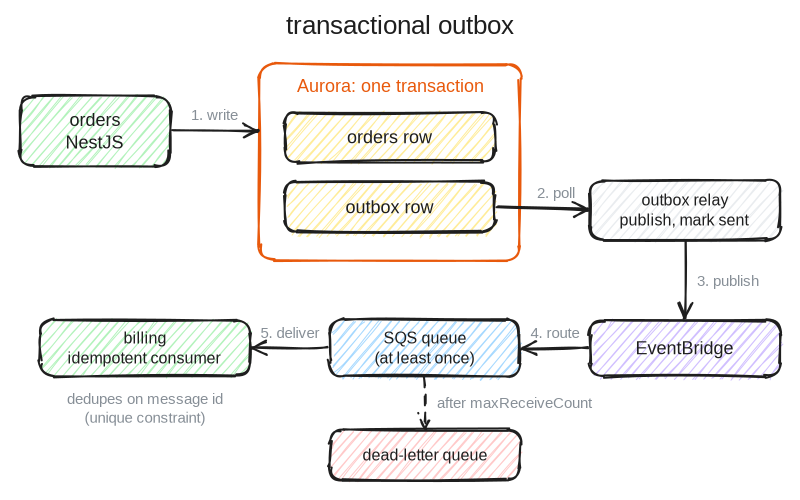
When orders creates an order, it needs to save it and tell billing. Writing to the database and then publishing to EventBridge is two writes with no transaction around them. Crash in between, and billing either never hears about the order or hears about one that was rolled back.
The transactional outbox "resolves the dual write operations issue". Write the order and an outbox row in the same transaction, and have a relay publish unsent rows:
-- orders service: one transaction
BEGIN;
INSERT INTO orders (id, customer_id, total_cents) VALUES ($1, $2, $3);
INSERT INTO outbox (id, topic, payload) VALUES (gen_random_uuid(), 'order.created', $4);
COMMIT;

-- relay: claim a batch without blocking other relays, publish, then mark it sent
SELECT id, topic, payload FROM outbox
WHERE sent_at IS NULL
ORDER BY created_at
LIMIT 100
FOR UPDATE SKIP LOCKED;
UPDATE outbox SET sent_at = now() WHERE id = ANY($1);
The relay can publish an event twice, if it crashes after publishing and before marking it sent. SQS standard queues are at-least-once anyway: "more than one copy of a message might be delivered." So consumers have to be idempotent:
-- billing service: in the same transaction as the work itself
INSERT INTO processed_messages (message_id) VALUES ($1)
  ON CONFLICT (message_id) DO NOTHING
  RETURNING message_id; -- no row back: already processed, commit and stop
Messages that keep failing move to a dead-letter queue after maxReceiveCount receives. A dead-letter queue with more than zero messages should page someone.
Seeing it
- Instrument both tiers with OpenTelemetry. Next.js uses
instrumentation.tswithregisterOTelfrom@vercel/otel; NestJS uses the Node SDK's auto-instrumentations. The W3Ctraceparentheader then carries one trace from CloudFront to the database. - Ship it to CloudWatch. AWS now recommends the CloudWatch agent, or any OpenTelemetry collector exporting to CloudWatch's OTLP endpoints, which gives you Application Signals and X-Ray traces.
- Alarm on these from day one:
- p99 latency and 5xx rate per service;
- a breaker opening;
- dead-letter queue depth above zero;
- RDS Proxy client connections near the limit.
Keep those alarm definitions in each service's repo, next to the code. That's the SRE north star.
Shipping it
- Infrastructure as code, with each zone as its own CDK construct. A security-group rule between zones is then a reviewed diff, not a console click.
- One AWS account per environment, in AWS Organizations. An account is the hardest boundary AWS has; staging should not be able to reach production's data zone even by mistake.
- ECS's deployment circuit breaker rolls back a deployment whose new tasks keep failing. It's the same idea as the request-level breaker, applied to releases. ECS also does blue/green, linear and canary deployments natively now.
- Expand, then contract for schema changes. Add the new column, deploy code that writes both, backfill, switch reads, drop the old column. Each step deploys, and can be rolled back, on its own.
- Secrets come from Secrets Manager through the task definition. They're "injected into your container when the container is initially started", so running tasks won't see a rotated value until they're replaced. That's one more reason to prefer IAM authentication for the database.
- Break things on purpose. Netflix's Chaos Monkey works by "randomly terminating instances in production to ensure that engineers implement their services" to survive it. AWS's managed version is Fault Injection Service. Netflix tested its load-shedding buckets this way, shedding chosen priorities for a small group of real users. The first experiment found a race condition in its Android and iOS apps. Start in staging, and find out whether your breaker actually opens.
How AWS, Google and Netflix do it
None of this is new. Most of it comes from a handful of public sources, worth reading in full:
AWS
- Builders' Library: Timeouts, retries, and backoff with jitter: retry at one layer, use a token bucket, add jitter.
- Builders' Library: Implementing health checks: shallow vs deep checks, failing open.
- Builders' Library: Using load shedding to avoid overload.
- Builders' Library: Avoiding fallback in distributed systems: why Amazon almost never uses fallback.
- Builders' Library: Making retries safe with idempotent APIs and Static stability using Availability Zones.
- Prescriptive Guidance: circuit breaker, retry with backoff and transactional outbox.
- Well-Architected Framework:
- SEC05, Protecting networks: network layers and traffic between them.
- REL04 and REL05, on designing interactions between services: idempotency, throttling, retries, timeouts, graceful degradation.
- REL10, on fault isolation and bulkheads.
- The cell-based architecture whitepaper.
- SRE book: Addressing Cascading Failures: deadline propagation, retry limits, load shedding.
- SRE book: Handling Overload: the three-attempt and 10% retry budgets, and client-side throttling.
- BeyondProd and ALTS: zero trust between services, with mutually authenticated service identities.
- The Tail at Scale (Dean and Barroso, 2013): hedged requests and other tail-latency techniques.
Netflix
- Hystrix: circuit breakers, isolation and fallbacks. It's in maintenance mode now, but its README is still the best short explanation of why.
- concurrency-limits: adaptive load shedding.
- Keeping Netflix Reliable Using Prioritized Load Shedding: request buckets, priority scores, and backpressure for retry storms.
- Edge Authentication and Token-Agnostic Identity Propagation: ending external tokens at the edge, and propagating a Passport instead.
- Zero Configuration Service Mesh with On-Demand Cluster Discovery: why Netflix moved resilience features from client libraries into Envoy.
- Chaos Monkey and the Principles of Chaos Engineering.
Others
- Microsoft's Azure Architecture Center: Backends for Frontends, Gatekeeper, Circuit Breaker and Bulkhead.
- Stripe: Designing robust and predictable APIs with idempotency.
- Martin Fowler: CircuitBreaker.
- NIST: SP 800-207 Zero Trust Architecture.
Checklist
Edge and web
- Only CloudFront is public. The ALB is internal behind a VPC origin, or locked to CloudFront.
- WAF has the core rule set, known bad inputs, IP reputation and rate-based rules.
- Next.js keeps data access in
server-onlymodules and puts no service URL in aNEXT_PUBLIC_variable. - Every Server Action checks the session itself.
- Every
fetchhas a timeout, and Node's keep-alive is longer than the ALB's 60 seconds.
Services and network
- Every NestJS service verifies the user token itself.
- Each service has one security group and one task role. Rules name security groups, and there's no path from web to data.
- Data subnets have no route out. RDS Proxy uses IAM auth and TLS, with one database user per service.
Resilience
- Timeouts nest from a deadline. Retries happen at one layer, capped and jittered, with idempotency keys on writes.
- Each downstream dependency has a circuit breaker and a bulkhead, with an alarm on open.
- Requests are tagged by priority, the lowest priority is shed first, and responses carry
Retry-After. - ECS health checks are shallow; deep checks feed alarms only.
- Shutdown is graceful:
enableShutdownHooks(), and a deregistration delay near your slowest request. - Events go through an outbox to idempotent consumers, with an alarm on the dead-letter queue.
Operations
- One trace runs across all four zones.