One Worktree Per Ticket, One PR Per Layer
You're forty minutes into a feature. Half-finished code everywhere, dev server warm, head finally in the problem. Then production breaks.
So you do the dance. git stash. git checkout main. Dependencies are now wrong for this branch, so reinstall. Dev server restarts cold. Twenty minutes later the fix is shipped, you switch back, and git stash pop hands you a conflict in a file you'd forgotten you touched.
None of that was hard. All of it was overhead, and every bit came from one assumption: one clone gets one working directory.
Git stopped requiring that in 2015. Almost nobody uses the escape hatch.
What a worktree actually is
A normal clone is two things glued together: a .git directory holding history, and one working directory holding checked-out files. git worktree splits them. One .git, many working directories, each on its own branch.
git worktree add ../proj-feature-a -b feature-a
git worktree list
That's a complete second checkout, created in about a second, because nothing is re-cloned and nothing is re-fetched.
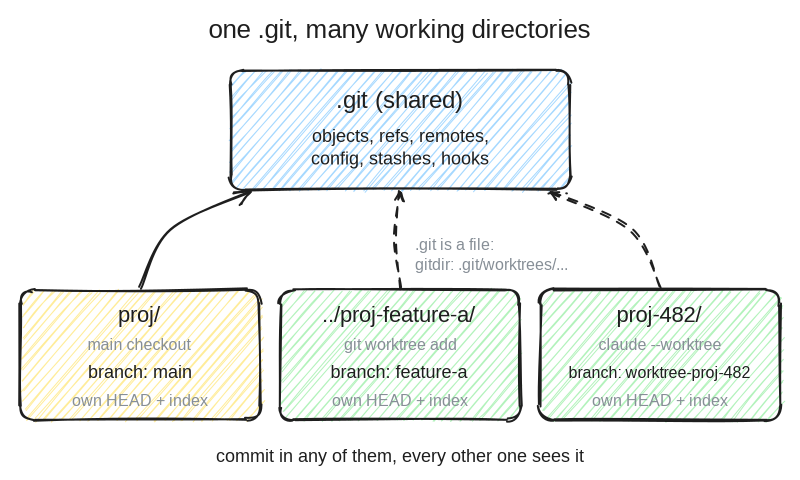
The mechanism is worth seeing once. In a linked worktree, .git is a file, not a directory — a single line pointing back at .git/worktrees/<name> in the main repo, where that worktree's private state lives:
cat ../proj-feature-a/.git
# gitdir: /path/main/.git/worktrees/proj-feature-a
Shared across every worktree: objects, most refs, remotes, config, stashes, hooks. Per-worktree: HEAD, the index, and refs/bisect, refs/worktree, refs/rewritten. You can reach across with main-worktree/HEAD and worktrees/<name>/HEAD.
The cold open, done properly
Same emergency, no stashing:
git worktree add -b emergency-fix ../temp main
cd ../temp
# ...fix...
git commit -a -m 'emergency fix'
cd -
git worktree remove ../temp
The branch you were on never changed. Your messy files were never touched. The commit landed in the shared object store, so it's visible from the main checkout immediately.
Flags worth knowing on add: -b new branch, -B to create the branch or reset it if it exists, -d for a detached look at a commit, --track for upstream, --orphan for an empty unborn branch, --no-checkout when you need to configure sparse-checkout before any files land, --lock to create it already protected. Drop -b and pass an existing branch to check that branch out over there.
And then the behaviour that shapes everything later in this post:
git worktree add ../another-copy fix-issue-456
# fatal: 'fix-issue-456' is already used by worktree at '/path/project-bugfix'
Git refuses to check out the same branch in two worktrees. --force overrides it. Don't. Hold onto this.
Claude Code makes it one flag
claude --worktree feature-auth
That creates a worktree under .claude/worktrees/feature-auth, on a new branch worktree-feature-auth, and starts the session inside it. Run it again with a different name in another terminal for a second isolated session.
Two pieces of housekeeping, both of which you will regret skipping:
echo '.claude/worktrees/' >> .gitignore
# .worktreeinclude
.env
.env.local
config/secrets.json
The first stops every worktree's files showing up as untracked noise in your main checkout. The second solves the fresh-checkout problem: a worktree has none of your gitignored files, so .worktreeinclude (gitignore syntax) copies the ones you name into every worktree Claude creates. Only files that match and are gitignored get copied, so tracked files are never duplicated. Dependencies you still install yourself.
By default a new worktree branches from your repository's default branch on the remote. Set worktree.baseRef to "head" to branch from your current HEAD instead, carrying unpushed work:
{ "worktree": { "baseRef": "head" } }
For reviewing someone else's work, pass a PR number — quoted, or your shell treats # as a comment:
claude --worktree "#1234" # fetches the PR head into .claude/worktrees/pr-1234
Once a session is in a worktree, Claude Code enforces the isolation rather than trusting it: it blocks edits to paths in the main checkout, blocks commands whose working directory resolves there, blocks git redirected back via -C, --git-dir, GIT_DIR or a cd, and refuses commands whose shape it can't resolve without running them — a command name computed at runtime, syntax it can't parse, indirect expansions like ${!name}. Subagents inherit all of it, and a custom subagent can make it permanent with isolation: worktree in its frontmatter.
The actual workflow
Ticket PROJ-482: add rate limiting to the public API. Config, the limiter, route wiring, docs.
claude --worktree proj-482
pnpm install
Named after the ticket, so in six days I still know what the directory is.
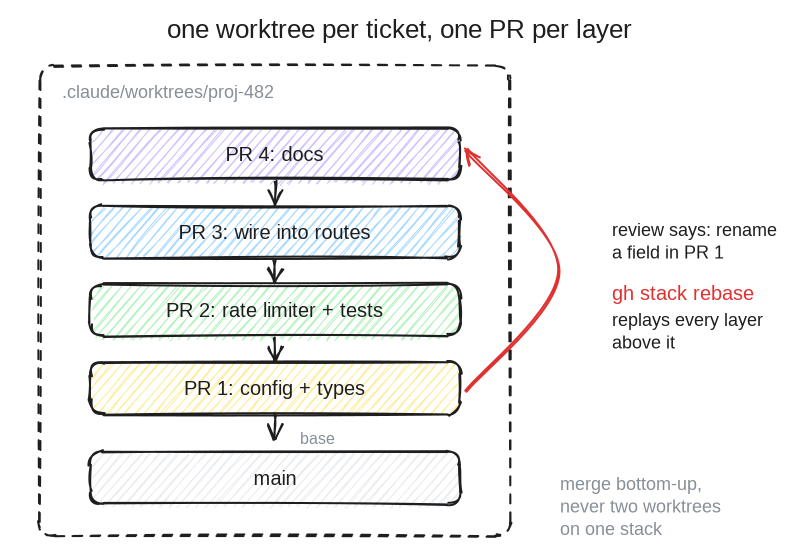
Then the step people skip: before writing anything, decide how the ticket splits into review-sized pieces. Config and types. The limiter with its tests. Route wiring. Docs. Four layers, four pull requests.
Name layers after what a reviewer wants to look at in one sitting, not after your commits. If layer three can't compile without layer two, that's correct — in a stack, a dependency must live in the same layer or a lower one.
Stacked pull requests
Ship all four layers as one PR and it's 900 lines, it sits for three days, and you get "LGTM". Ship them one at a time and you're blocked waiting for merges. Stacked PRs are the way out: a chain where each pull request targets the branch below it, so each diff shows only its own layer.
gh extension install github/gh-stack

gh stack init                       # names the first branch, enables git rerere
git add . && git commit -m "Add rate limit config and types"

gh stack add rate-limiter           # next layer, on top of the current one
gh stack add -Am "Wire limiter into routes"   # stage all + commit; branch name auto-generated

gh stack view
gh stack push
gh stack submit --open              # or --auto to skip the editor
That creates one PR per layer, each based on the branch below, linked into a stack on GitHub with a stack map on every PR. Move around with gh stack up, down, top, bottom, trunk, switch, or checkout by stack number, PR number, PR URL, or branch name. Stack metadata lives in .git/gh-stack and isn't committed.
Notice what I am not doing: a worktree per layer.
One worktree for the ticket. The whole stack lives inside it. Git won't check out the same branch twice, so a layer parked in a second worktree can only be rebased through that worktree — and if it's dirty, gh stack rebase and sync stop. Keep the stack in one place and none of that comes up.
Worktree isolation is per context. A stack is per decomposition of one change inside that context.
When layer one changes
This is the question everyone asks. A reviewer comments on the bottom PR: rename this config field. Three PRs above it use that field.
gh stack down
git commit -am "Rename limit window field"
gh stack rebase
gh stack rebase fetches and cascades a rebase upward, replaying each layer onto the new version of the layer below. Scope it with --downstack (toward trunk only), --upstack (away from trunk only), or --no-trunk.
On a conflict it stops and names the files. Resolve, git add, then:
gh stack rebase --continue
# or
gh stack rebase --abort        # restores every branch to its pre-rebase state
That --abort is why I'm comfortable rebasing a five-deep stack. And this is where rerere — which gh stack init turned on for you — earns its keep: a conflict you resolve once gets replayed automatically the next time the same conflict appears, and in a stack the same conflict appears a lot.
When you want the remote updated too:
gh stack sync --prune          # fetch + rebase + push + PR state; drops merged locals
gh stack merge --squash        # merges bottom-up; takes a stack or PR number
Once the bottom PR merges, the next rebase notices and replays onto the merge target automatically.
One honest caveat: rebasing rewrites the upper branches, so those are force-pushes, and reviewers lose their "changes since last review" marker on those layers. Batch your rebases.
Keeping worktrees around
The stack is up for review and I'm moving to the next ticket — but review comments are coming, so I keep the worktree. Claude's exit prompt asks, because it checks whether removal would destroy changed files, untracked files, or new commits.
For anything I'm keeping more than a day or two:
git worktree lock --reason "PROJ-482 in review" .claude/worktrees/proj-482
git worktree list -v
A locked worktree can't be pruned, moved, or removed by accident, and the reason string shows up in list -v so future-me knows why it's there.
Claude's own cleanup is conservative: it sweeps worktrees it created for subagents and background sessions once they exceed cleanupPeriodDays, and skips any holding changes, untracked files, or unpushed commits. A --worktree session's worktree is never swept, whatever its age — unless you background that session, which turns it into a background-session worktree the sweep can remove.
Coming back is the same command as creating it. claude --worktree proj-482 reopens the existing directory. With the default "fresh" base it only resets to the default branch when the worktree is genuinely finished — clean tree, still on its original branch, and either no commits of its own or its PR already merged with the remote branch gone. Anything else reopens where you left off.
Edge cases
The ones that have actually cost me time:
fatal: '<branch>' is already used by worktree at ...— the same-branch refusal.--forceexists; don't. One worktree per ticket,gh stack switchbetween layers.gh stack modifywon't start — it wants a clean working tree and linear history.rebaseandsyncalso stop if a worktree that owns a stack branch is dirty. Commit or stash first.- You
rm -rf'd a worktree — the bookkeeping survives.git worktree prune. If you moved it by hand instead,git worktree repair. removesays the worktree is locked —git worktree unlock <path>first, orgit worktree remove --force --force. Two forces, deliberately.removerefuses over uncommitted changes —--forcedeletes them and any unpushed commits with them. Checkgit worktree listand that worktree'sgit statusfirst.- No
node_modules, no.env— fresh checkout by design..worktreeincludefor gitignored files, an install step for dependencies, and watch your disk: each worktree is a full checkout. - You moved the repo and worktrees broke — links are absolute by default.
git worktree repairfixes them;--relative-pathsonaddavoids it next time. - Submodules — git's own docs call multiple checkouts of a superproject not recommended, and
git worktree movedoesn't support them. - "Refusing to use
<path>as an isolation worktree … launch from the parent checkout" — you started Claude from inside a worktree you made withgit worktree add. Launch and resume from the main checkout. - Headless runs leave worktrees behind —
claude -p --worktreehas no exit prompt and doesn't clean up, and its lock stays until a later sweep.git worktree unlock, thengit worktree remove. - A hook can't find the worktree —
${CLAUDE_PROJECT_DIR}deliberately stays at the project root. Read thecwdfield from the hook's input JSON. - Claude won't create a worktree on a symlinked path —
.claude,.claude/worktrees, or the worktree path itself is a symlink. Remove it and retry. - A worktree lacks the work it should build on — the default base is the remote default branch. For a worktree that must sit on in-progress work, use
worktree.baseRef: "head"orgit worktree add <path> <existing-branch>. - The stack won't form — stacks live in one repository. No cross-fork stacks, no GitHub Desktop, merges go bottom-up, and programmatic merging needs the asynchronous merge API.
- CI bill jumped — every layer is a PR, so checks run per layer and each cascading rebase re-triggers them. And merge requirements come from the bottom PR's base branch (usually
main): branch protection and CODEOWNERS approvals apply to every PR in the stack, not just the bottom one. - Untracked noise in the main checkout —
.claude/worktrees/in.gitignore.
The rule
A worktree is per context: a ticket, a hotfix, a PR you're reviewing, an agent you've set loose.
A stacked PR is per layer of one change, and the whole stack lives in a single worktree.
Get that split right and the stash dance from the top of this post simply stops happening.